// Unified Apps section — one surface, four tabs (local / cloud / mobile / integrations),
// with the "why ActionBoard" trio underneath. Replaces the split app + desktop sections.

const APP_TABS = [
  {
    id: 'local', label: 'Local', icon: 'Home', tag: 'Voltron desktop',
    title: 'Turn your machine into an AIOps command center.',
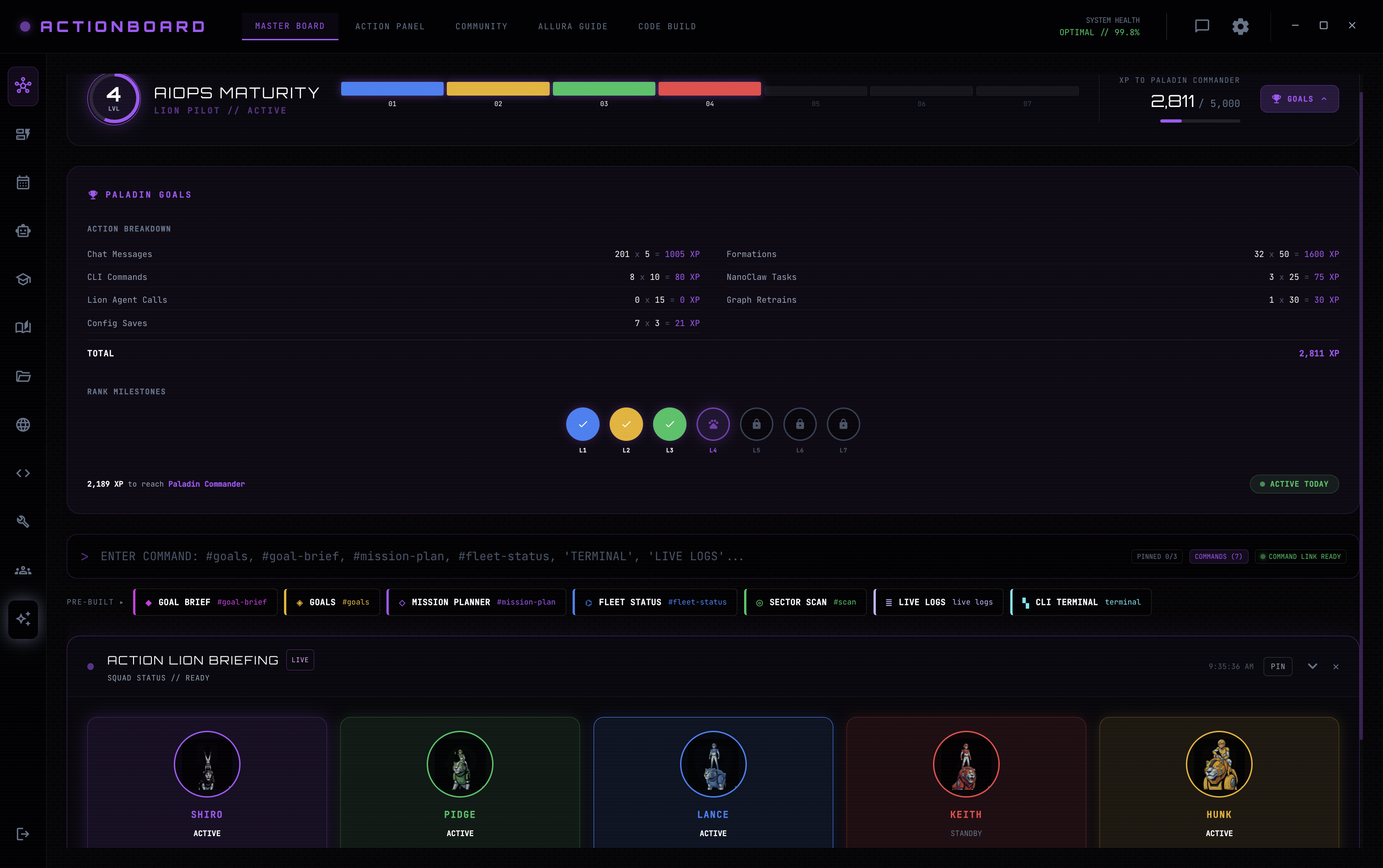
    lead: 'Voltron is the desktop app for local AIOps — Browser Action Panels plus a fleet of coding and action agents, running fully local or hybrid. Formation scales the Lions across local and cloud only when it is the cost-effective call.',
    ctas: [{ label: 'Download Voltron', href: 'Welcome.html', icon: 'Download', primary: true, waitlist: true }, { label: 'See it in action', href: '#labs', icon: 'Play' }],
    plat: [['Apple', 'macOS'], ['Windows', 'Windows'], ['Linux', 'Linux']],
    features: [
      { icon: 'Home', title: 'Local-first', body: 'Runs on your own machine. Repos, data, and agents stay local until you decide otherwise.' },
      { icon: 'Globe', title: 'Browser Action Panels', body: 'Agents drive real web apps in embedded tabs — capture flows, run templates, automate anything.' },
      { icon: 'Code', title: 'Coding + action agents', body: 'Multiple agents (Voltron Code Build) work your codebase in parallel, live.' },
      { icon: 'Compass', title: 'Voltron Formation', body: 'Lions burst local ↔ cloud on demand — you only pay for the cloud when it earns it.' },
    ],
  },
  {
    id: 'cloud', label: 'Cloud', icon: 'Cloud', tag: 'app.actionboard.ai',
    title: 'The same board, live in your browser.',
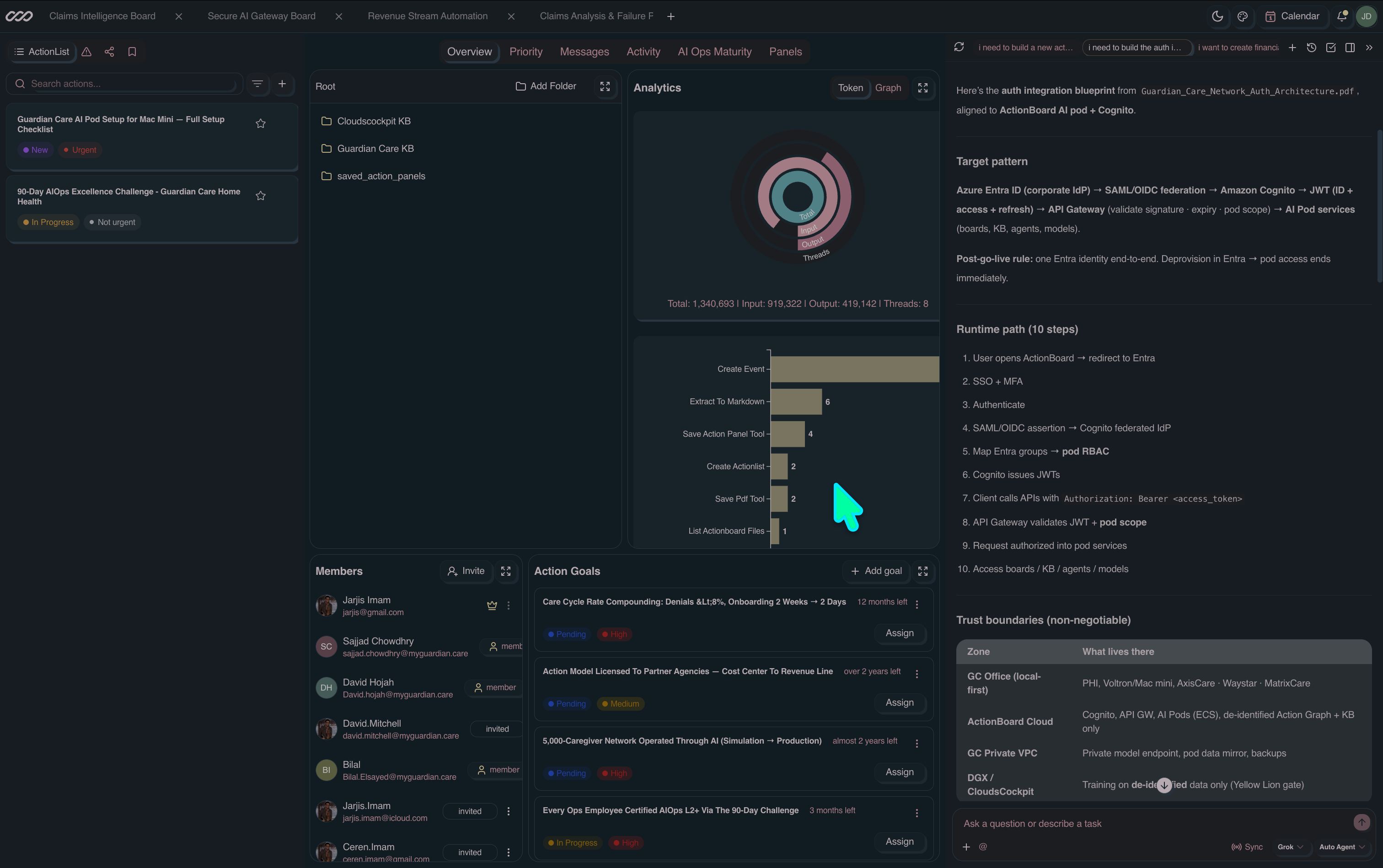
    lead: 'Nothing to install. Boards, team goals, live analytics and the AI action chat run against your Castle in the cloud — the place your team does the work together.',
    ctas: [{ label: 'Open the web app', href: 'Welcome.html', icon: 'ArrowRight', primary: true }, { label: 'Build a Castle', href: 'Voltron.html', icon: 'Castle', waitlist: true }],
    features: [
      { icon: 'Zap', title: 'Zero setup', body: 'Sign in and the board is already running your ActionLists — no install, no runtime to babysit.' },
      { icon: 'User', title: 'Team boards', body: 'Assign goals, @mention teammates, share boards, and watch members and analytics update live.' },
      { icon: 'Activity', title: 'Live run analytics', body: 'Every run, veto and token charge lands on the board the moment it happens.' },
      { icon: 'Shield', title: 'Gated by Yellow Lion', body: 'Policy gates travel with the workspace — the same Charter applies in the cloud.' },
    ],
  },
  {
    id: 'mobile', label: 'Mobile', icon: 'Mobile', tag: 'iOS · Android',
    title: 'Your whole ActionBoard, in your pocket.',
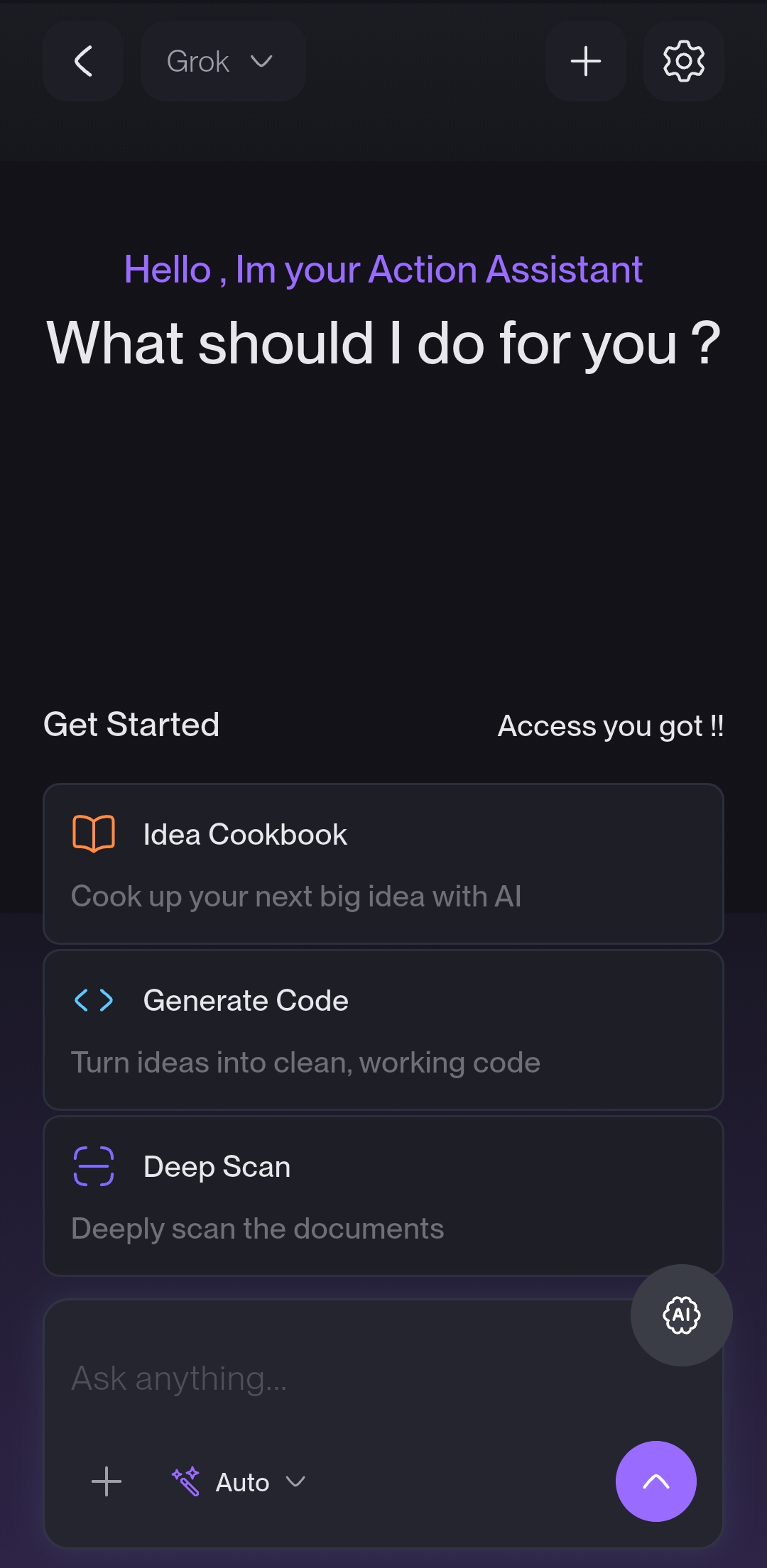
    lead: 'The full app travels with you — your ActionList with Ask AI, the calendar and schedule, team boards and chat, canvas action items, goals, and files. Fire actions, approve gates, and watch runs land with full parity to web and desktop.',
    ctas: [{ label: 'Get the app', href: 'Welcome.html', icon: 'Download', primary: true, waitlist: true }],
    plat: [['Apple', 'iOS'], ['Mobile', 'Android']],
    features: [
      { icon: 'Sparkles', title: 'ActionList + Ask AI', body: 'Your live ActionList with an Ask-AI bar that scopes an outcome and runs it — approve, veto, or delegate in a tap.' },
      { icon: 'Calendar', title: 'Calendar & schedule', body: 'Every run, deadline and confirmed event on one calendar with today’s schedule front and center.' },
      { icon: 'User', title: 'Boards, chat & files', body: 'Team boards, member chat, canvas action items, goals and files — all in sync with web and desktop in real time.' },
    ],
  },
  {
    id: 'panels', label: 'Action Panels', icon: 'Grid', tag: 'AI-built UI',
    title: 'Prompt an interface into existence.',
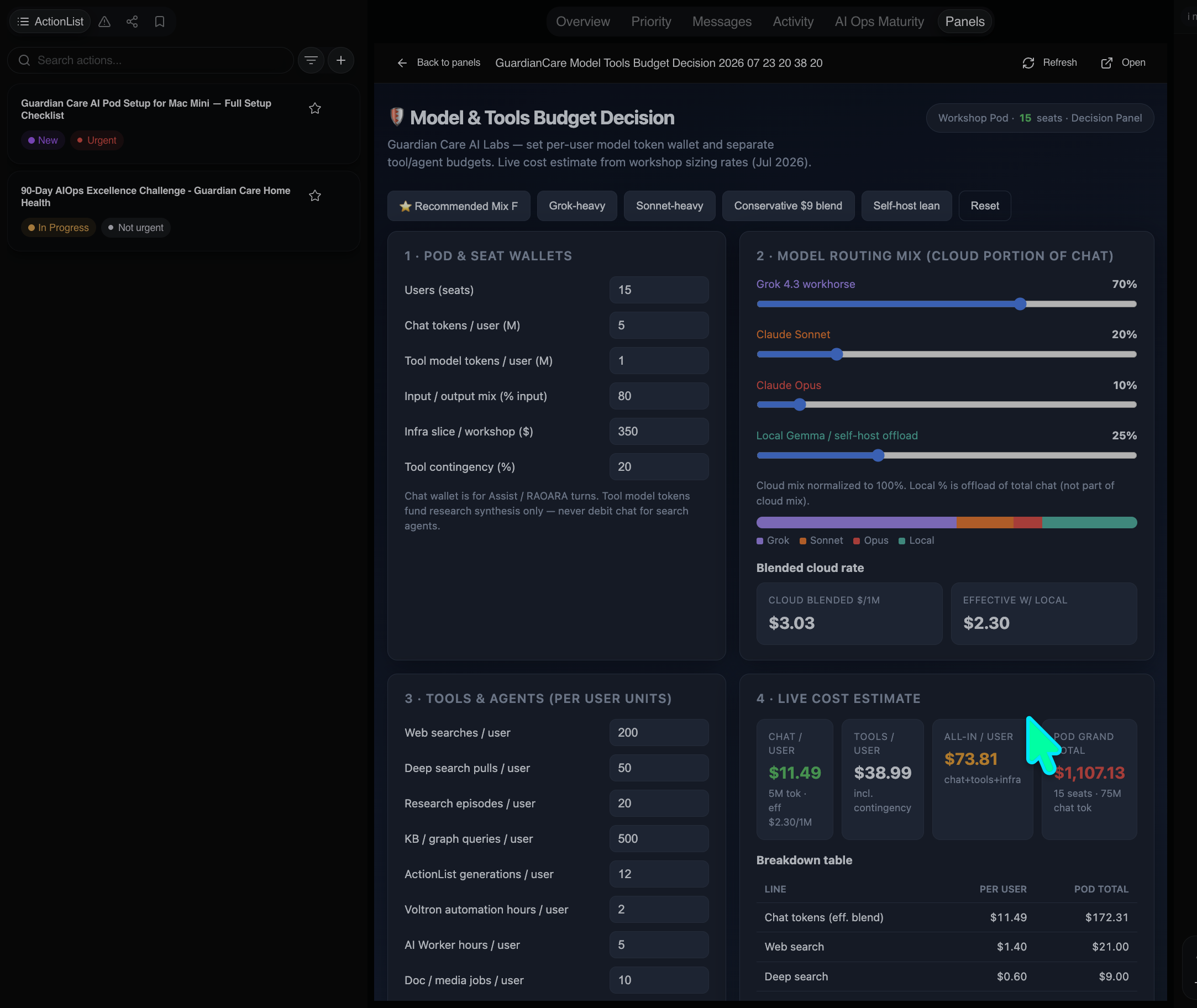
    lead: 'Action Panels are AI-driven UIs you build by describing them. Spin up a custom decision board, a live cost model, or a simplified physical-AI interface for users with disabilities — no design or code required.',
    ctas: [{ label: 'Build a panel', href: 'Welcome.html', icon: 'Sparkles', primary: true }, { label: 'See a live example', href: '#labs', icon: 'ArrowRight' }],
    features: [
      { icon: 'Sparkles', title: 'Prompt to build', body: 'Describe the panel you need in plain language; ActionBoard generates the live, interactive UI around your own data.' },
      { icon: 'Compass', title: 'Custom decision boards', body: 'Sliders, wallets, routing mixes and live cost estimates — assemble the exact control surface a decision needs.' },
      { icon: 'User', title: 'Accessible physical-AI', body: 'Generate simplified, large-target interfaces that drive physical AI for users with disabilities.' },
    ],
  },
  {
    id: 'integrations', label: 'Integrations', icon: 'Link', tag: 'MCP + connectors',
    title: 'Every tool you already run, as a gear.',
    lead: 'Connect an account or a remote MCP server once. Yellow Lion gates the registration, then every Lion can reach for it — no per-agent plumbing.',
    ctas: [{ label: 'Browse the pod registry', href: 'Pods.html', icon: 'ArrowRight', primary: true }, { label: 'Connect a remote MCP', href: 'Voltron.html', icon: 'Server', waitlist: true }],
    features: [
      { icon: 'Server', title: 'Federated MCP gateways', body: 'Point at any MCP server — local, hosted, or a teammate\'s Action Assist endpoint.' },
      { icon: 'ShieldCheck', title: 'Consent before registration', body: 'Nothing joins the stack until the Yellow Lion consent gate clears it.' },
      { icon: 'Database', title: 'Scoped knowledge access', body: 'Grant per-collection read or write — the Green Lion only sees what you allow.' },
    ],
  },
];

const MOBILE_SHOTS = [
  { src: 'assets/app-mobile-actionlist.jpg', cap: 'Action list', tag: 'Ask AI' },
  { src: 'assets/app-mobile-calendar.jpg', cap: 'Calendar', tag: 'schedule' },
  { src: 'assets/app-mobile-chat.jpg', cap: 'Team chat', tag: 'boards' },
  { src: 'assets/app-mobile-canvas.jpg', cap: 'Canvas', tag: 'action items' },
  { src: 'assets/app-mobile-goals.jpg', cap: 'Action goals', tag: 'targets' },
  { src: 'assets/app-mobile-wheel.jpg', cap: 'Quick nav', tag: 'radial menu' },
];

const VOLTRON_SHOTS = [
  { src: 'assets/voltron-code.png', cap: 'Code Build', tag: 'coding agents' },
  { src: 'assets/voltron-panel.png', cap: 'Action Panel', tag: 'browser panels' },
  { src: 'assets/voltron-allura.png', cap: 'Allura Guide', tag: 'RAOARA' },
];

const WHY_ACTIONBOARD = [
  { icon: 'Zap', tint: '#a855f7', title: 'Fast execution, any model', body: 'A live interface that fires actions the moment you decide — run every step with any model you choose, no lock-in.' },
  { icon: 'Layers', tint: '#0284c7', title: 'Structured action datasets', body: 'Build structured datasets as you work, so the board learns exactly which actions still need you in the loop.' },
  { icon: 'Compass', tint: '#059669', title: 'Compounding action goals', body: 'Hit a goal once and the model adapts — rerun the same goal on your own action model instead of a frontier LLM.', stat: '−89% tokens' },
];

const WinChrome = ({ title, url, children }) => (
  <div className="lp-macwin">
    <div className="lp-macbar">
      <div className="lp-macdots">
        <span style={{ background: '#ff5f57' }} />
        <span style={{ background: '#febc2e' }} />
        <span style={{ background: '#28c840' }} />
      </div>
      {url
        ? <div className="lp-browser-url"><I.Lock size={11} /> {url}</div>
        : <div className="lp-mactitle">{title}</div>}
      <span style={{ width: 52, flex: 'none' }} />
    </div>
    {children}
  </div>
);

const IntegrationsBoard = () => (
  <div className="lp-int-board">
    <div className="lp-int-grid">
      {PROFILE_ACTIONS.map(a => {
        const Ico = I[a.icon] || I.Link;
        return (
          <div className={`lp-int-chip ${a.verified ? 'on' : ''}`} key={a.id}>
            <span className="lp-int-ico"><Ico size={15} /></span>
            <span className="lp-int-name">{a.label}</span>
            {a.verified && <span className="lp-int-ok"><I.Check size={12} /></span>}
          </div>
        );
      })}
    </div>
    <div className="lp-int-mcp">
      <span className="lp-int-mcp-label mono">mcp://</span>
      <span className="lp-int-mcp-url mono">jarjisimam.actionboard.ai/assist</span>
      <span className="badge badge-emerald" style={{ fontSize: 10.5 }}>consented</span>
    </div>
  </div>
);

const AppsSection = () => {
  const [tab, setTab] = React.useState('local');
  const t = APP_TABS.find(x => x.id === tab);
  return (
    <LpSection id="apps" dark>
      <div className="lp-vg" />
      <div style={{ position: 'relative', zIndex: 1 }}>
        <SectionHead
          center light icon="Layers" eyebrow="THE APPS"
          title="One board. Everywhere you work."
          lead="Local, cloud, mobile, and everything you plug into it — the same Castle, the same gears, the same policy gate." />

        <div className="lp-apps-tabs" role="tablist">
          {APP_TABS.map(x => {
            const Ico = I[x.icon] || I.Layers;
            return (
              <button key={x.id} role="tab" aria-selected={tab === x.id}
                className={`lp-apps-tab ${tab === x.id ? 'on' : ''}`} onClick={() => setTab(x.id)}>
                <Ico size={14} /> {x.label}
              </button>
            );
          })}
        </div>

        <div className="lp-apps-panel" key={t.id}>
          <div className="lp-apps-copy">
            <div className="lp-apps-tag mono">{t.tag}</div>
            <h3 className="lp-apps-title">{t.title}</h3>
            <p className="lp-apps-lead text-pretty">{t.lead}</p>
            <div className="lp-apps-ctas">
              {t.ctas.map(c => {
                const Ico = I[c.icon] || I.ArrowRight;
                if (c.waitlist) {
                  return (
                    <button key={c.label} type="button" className={`lp-btn ${c.primary ? 'lp-btn-primary' : 'lp-btn-ghost-light'}`} onClick={() => window.__openWaitlist && window.__openWaitlist()}>
                      <Ico size={14} /> {c.label}
                    </button>
                  );
                }
                return (
                  <a key={c.label} className={`lp-btn ${c.primary ? 'lp-btn-primary' : 'lp-btn-ghost-light'}`} href={c.href}>
                    <Ico size={14} /> {c.label}
                  </a>
                );
              })}
            </div>
            {t.plat && (
              <div className="lp-plat" style={{ justifyContent: 'flex-start' }}>
                <span>Available for</span>
                {t.plat.map(([ico, label]) => {
                  const Ico = I[ico] || I.Globe;
                  return <span className="badge" key={label}><Ico size={11} /> {label}</span>;
                })}
              </div>
            )}
          </div>

          <div className="lp-apps-shot">
            {t.id === 'local' && (
              <WinChrome key="local" title="Voltron — ActionBoard Command Center">
                <img className="lp-macshot" key="shot-local" src="assets/voltron-master.png"
                  alt="Voltron desktop app — Master Board with AIOps maturity and the five Action Lions" />
              </WinChrome>
            )}
            {t.id === 'cloud' && (
              <WinChrome key="cloud" url="app.actionboard.ai">
                <img className="lp-macshot" key="shot-cloud" src="assets/app-web.png"
                  alt="ActionBoard.ai web app — boards, analytics, team goals, and the AI action chat" />
              </WinChrome>
            )}
            {t.id === 'panels' && (
              <WinChrome key="panels" url="app.actionboard.ai/panels">
                <img className="lp-macshot" key="shot-panels" src="assets/app-panels.png"
                  alt="ActionBoard Action Panels — an AI-built decision board with live cost estimates" />
              </WinChrome>
            )}
            {t.id === 'mobile' && (
              <div className="lp-apps-phone" key="mobile">
                <img src="assets/app-mobile-assistant.jpg" alt="ActionBoard.ai on mobile — the Action Assistant home" />
              </div>
            )}
            {t.id === 'integrations' && <IntegrationsBoard />}
          </div>
        </div>

        <div className="lp-vfeat-grid">
          {t.features.map(f => {
            const Ico = I[f.icon] || I.Sparkle2;
            return (
              <div className="lp-vfeat" key={f.title}>
                <div className="lp-vfeat-ico"><Ico size={18} /></div>
                <h4>{f.title}</h4>
                <p className="text-pretty">{f.body}</p>
              </div>
            );
          })}
        </div>

        {t.id === 'local' && (
          <div className="lp-vthumbs">
            {VOLTRON_SHOTS.map(s => (
              <figure className="lp-vthumb" key={s.cap}>
                <img src={s.src} loading="lazy" alt={`Voltron ${s.cap}`} />
                <figcaption className="lp-vthumb-cap">{s.cap}<span className="mono">{s.tag}</span></figcaption>
              </figure>
            ))}
          </div>
        )}

        {t.id === 'mobile' && (
          <div className="lp-mphones">
            {MOBILE_SHOTS.map(s => (
              <figure className="lp-mphone" key={s.cap}>
                <img src={s.src} loading="lazy" alt={`ActionBoard mobile — ${s.cap}`} />
                <figcaption>{s.cap}<span className="mono">{s.tag}</span></figcaption>
              </figure>
            ))}
          </div>
        )}

        <div className="lp-why">
          <div className="lp-why-head">
            <span className="lp-oil-cap mono">Why ActionBoard</span>
            <span className="lp-why-rule" />
          </div>
          <div className="lp-gear-cards">
            {WHY_ACTIONBOARD.map(c => {
              const Ico = I[c.icon];
              return (
                <article className="lp-gear-card" key={c.title}>
                  <span className="lp-gear-ico" style={{ color: c.tint, borderColor: `${c.tint}44`, background: `${c.tint}18` }}><Ico size={16} /></span>
                  <h4>{c.title}</h4>
                  <p className="text-pretty">{c.body}</p>
                  {c.stat && <span className="badge badge-emerald" style={{ fontSize: 10.5, marginTop: 10 }}>{c.stat}</span>}
                </article>
              );
            })}
          </div>
        </div>
      </div>
    </LpSection>
  );
};

Object.assign(window, { AppsSection });